
Your subcontractors, in the same system as you
Invite subcontractors, hand them addresses and send out work they accept or decline. Their drivers document every stop in the same app as your crews, and settlement is drafted from the same completed work.
Dispatch invitation
Snow clearing, zone North
From Nordic Property Services
Message: Heavy snow from 04:00. Entrances clear before 07:00.
Reason (required to decline)
No answer? The owner can accept or decline on their behalf.
Subcontracting breaks down between the phone calls
Most snow removal companies rely on subcontractors. Few have a clear view of what those subcontractors actually did.
Work handed out by phone
Addresses, instructions and changes go out by call and text message, and nobody has the full list.
No view of subcontracted work
You find out a site was missed when the customer calls, not when it happens.
Settlement by spreadsheet
Matching what a subcontractor invoices against what you billed the customer takes hours every month.
Declines discovered too late
When a subcontractor cannot take a job, you often hear about it after the snow has fallen.
From invitation to settlement
How subcontracting works in SnowManager.
- 1
Invite your subcontractors
By their administrator's email or their company registration number.
- 2
Hand over addresses
With your cost for each work type and a note on what is expected.
- 3
Send out the work
They accept or decline, and their drivers do the work with the SnowManager app.
- 4
Settle the completed work
Subcontractor lines are drafted from the same completed stops as the customer's.
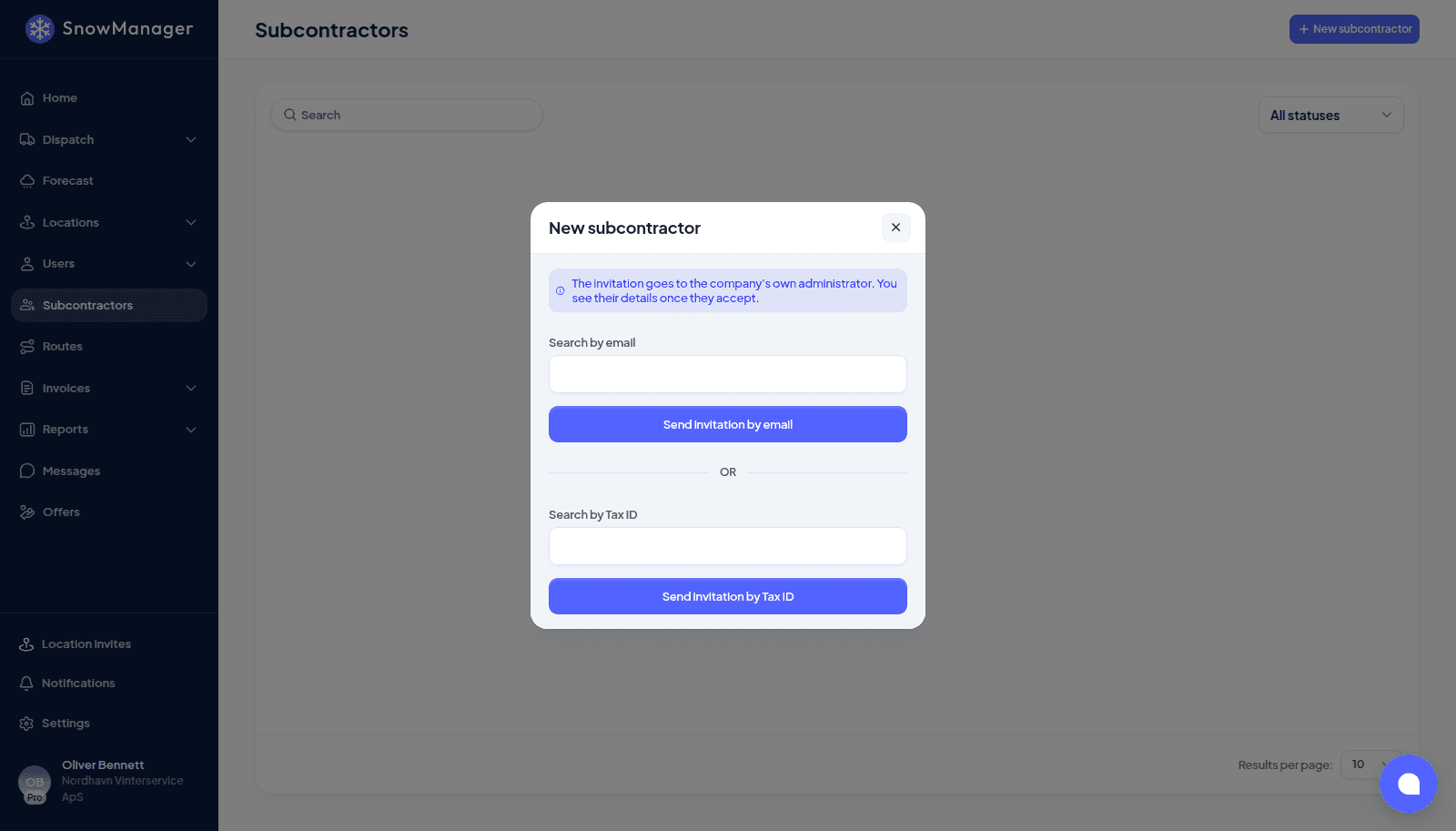
Invite by email or company registration number
Add a subcontractor that already uses SnowManager, or invite one that does not yet. You can start handing over addresses straight away.
- Invite a company by its administrator's email or its company registration number
- Not on SnowManager yet? They get an invitation to register their company
- Assign addresses before they accept: they see them as soon as they log in
- Withdraw an invitation and its addresses go back to being unassigned
Hand addresses down the chain
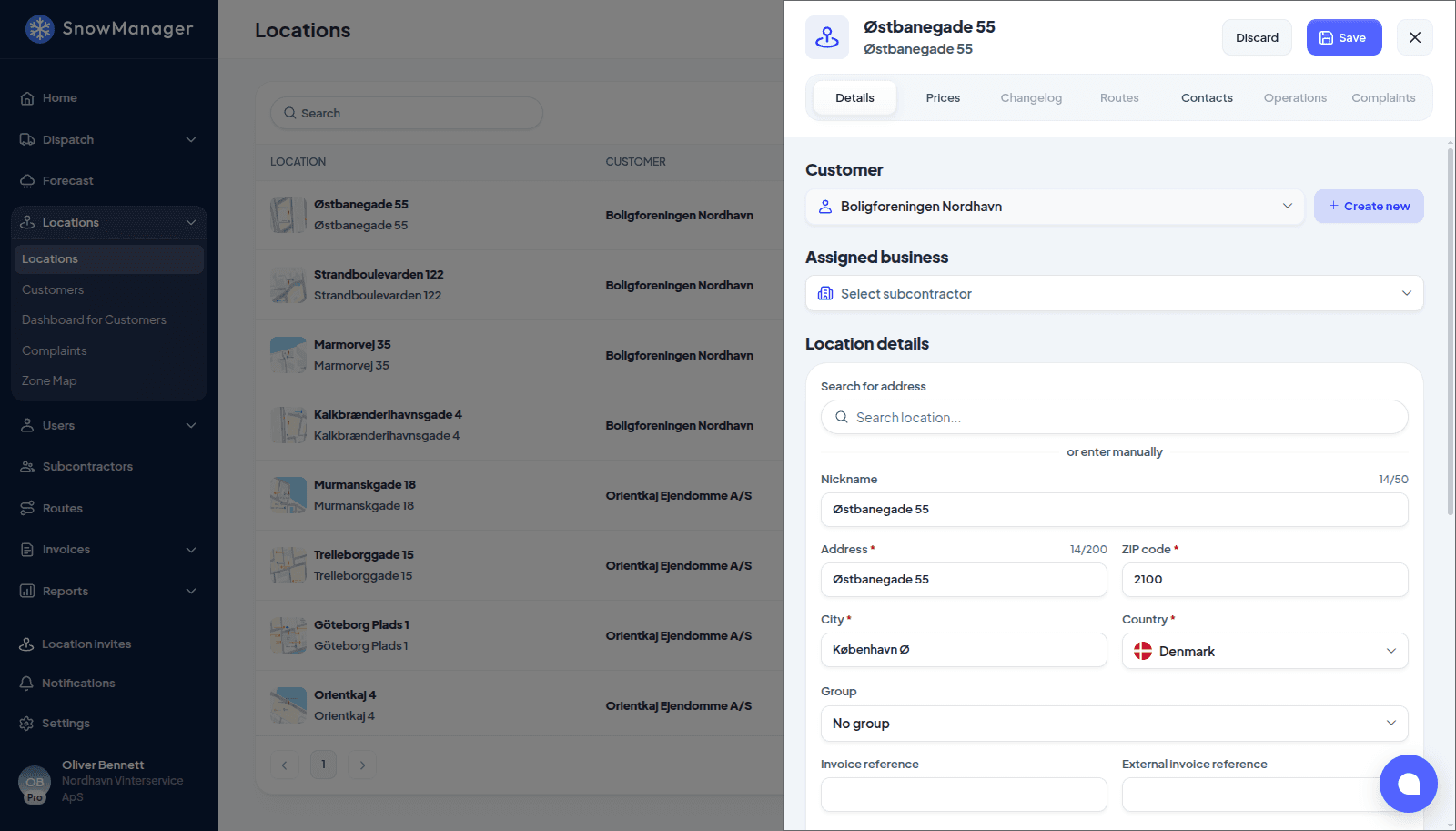
Give an address to a subcontractor, and they can give it to a subcontractor of their own. You deal with the company you hired, and each level works with its own prices.
- Assign addresses one at a time or many at once
- Your cost for a work type becomes the subcontractor's price, at every level of the chain
- A note on each address that the responsible subcontractor can see
- Change subcontractor, and the new one starts with a clean slate
They accept or decline. You stay in control.
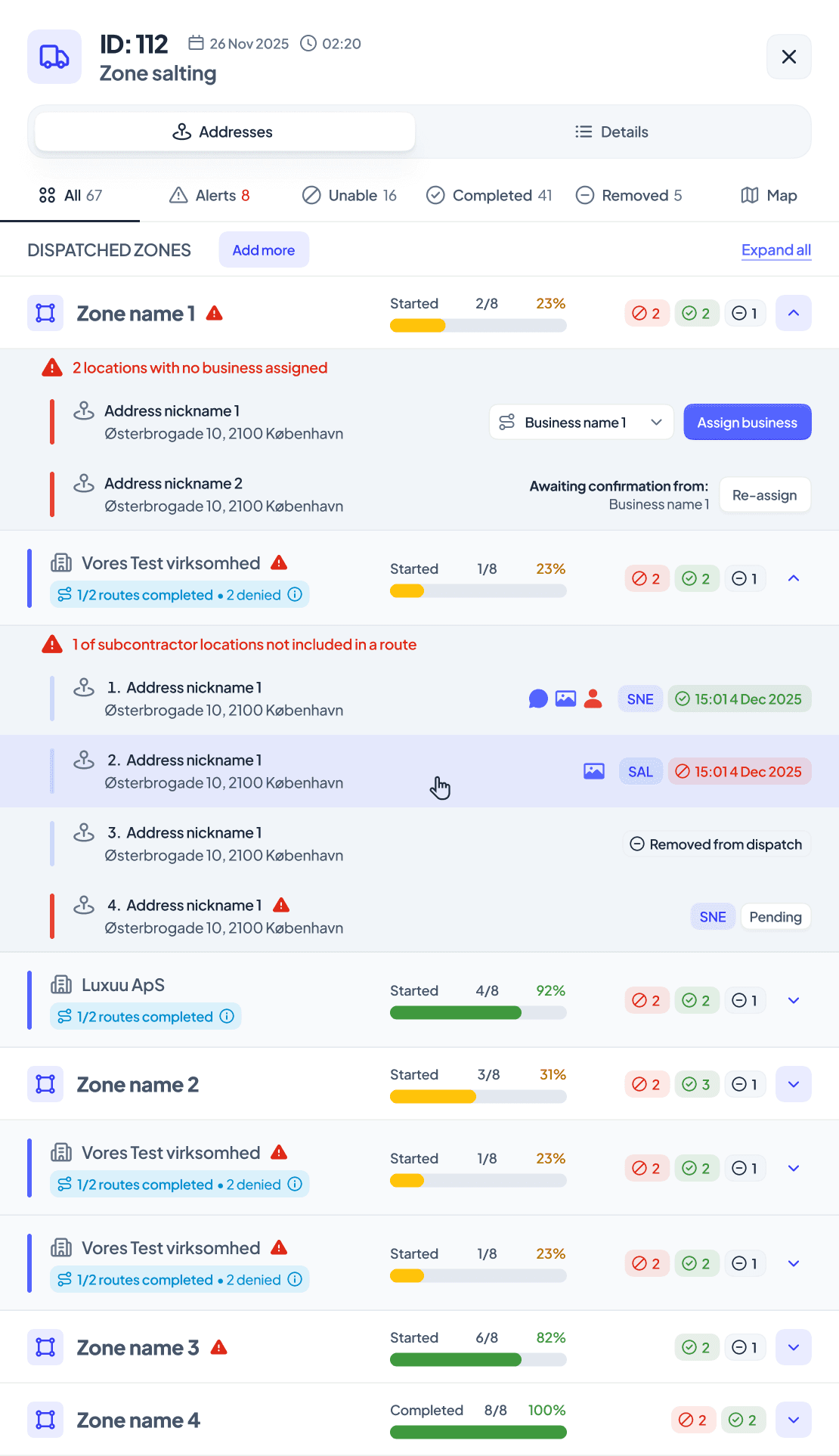
When you send out work, each subcontractor gets an invitation for their addresses. They accept, or decline with a reason, and you are told straight away so you can re-plan.
- Accept or decline the whole dispatch, or single addresses
- A reason is required to decline, and you are notified at once
- Accept or decline on behalf of a subcontractor who does not answer
- Link a new dispatch to the declined one it replaces
- Choose for each subcontractor whether they may dispatch your addresses themselves
Subcontracted work, documented like your own
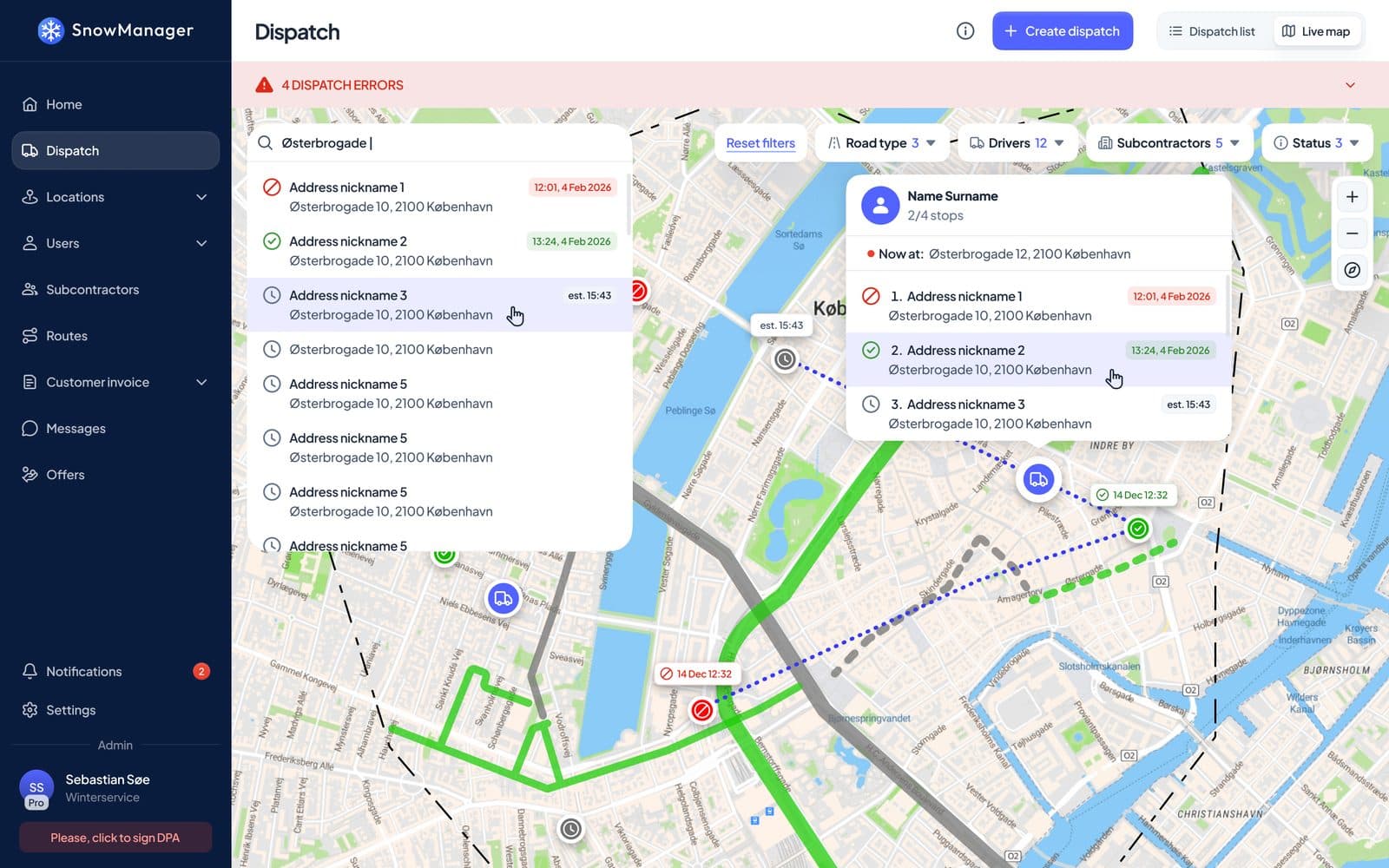
Your subcontractors' drivers use the same SnowManager app as your own crews. Their check-ins, times and photos land on the same dispatch, so you never have to ask whether the work was done.
- Subcontractors put their own drivers on the routes you hand over
- GPS check-in and check-out, and photos, on every stop
- Progress for each subcontractor, live on the dispatch
- The live map counts your own drivers and subcontractors' units separately
Settle from the same completed stop
When a stop is completed, the customer's invoice line and the subcontractor's line are drafted from the same work. Nobody types the job in twice.
- Settle the work your subcontractors did for you, and invoice the businesses you work for as a subcontractor
- Confirm each subcontractor's finished work without waiting for the whole dispatch
- Priced at your cost rate, including per-task pay on addresses the customer pays for by the season
- Customer and subcontractor lines that no longer match are flagged
- Export per subcontractor, and email the file to them when it is ready
Completed stop
Harbour Retail Park
Snow clearing, 15 Jan 05:42
Customer invoice line
Harbour Retail Park Owners
Subcontractor invoice line
Northside Plowing Ltd.
Know what each subcontractor earns you
A profit and loss view per subcontractor shows what their addresses earned and what they cost, so you can see where the margin is.
- Revenue, cost and margin for each subcontractor, for any period
- Complaints raised while a subcontractor was responsible for an address
- A supplier overview export with what each subcontractor invoiced and earned
- Offers priced at cost plus your margin, using the subcontractor nearest the address
Subcontractor P&L
What each subcontractor earned and cost this season
Margin
Good for the subcontractor, too
Subcontractors get their own SnowManager company account, not a guest login to yours.
Their own company account
Their own administrators, dispatchers and drivers, and a clear list of the addresses they have been given.
Clear instructions
A note on each address and a message with each dispatch, so their drivers know what is expected.
Their own subcontractors
They can hand addresses on to subcontractors of their own, with the same tools you use.
Invoice as a subcontractor
The work they did for you is ready to invoice, drafted from the same completed stops.
Complaints they can act on
They see the complaints raised on addresses they were responsible for.
Earnings in view
Their dashboard shows what they have earned as a subcontractor.
More from SnowManager
Municipalities
Road routes, live coverage and street history for winter road maintenance.
GPS tracking and proof of service
Live map, automatic check-in at stops and an insurance report for every completed stop.
Driver app
Navigation, automatic check-in, photos and offline mode for every driver.
Invoicing
Invoice drafts from completed work, sent straight to your accounting system.
Bring your subcontractors into one system
Book a 30-minute demo of invitations, dispatch and settlement with subcontractors.