
The complaint arrives at 8:15 AM: "nobody plowed our lot last night." The truth arrived at 02:38, when a plow spent nineteen minutes on that exact lot, but the truth was recorded nowhere except in a tired driver's memory, and the snow that fell at 6 AM erased the physical evidence. Without tracking, this conversation becomes a negotiation. With tracking, it becomes a lookup.
That's the real case for a snow plow tracker. Not surveillance, not gadgets: a recorded, timestamped answer to "who was where, when" for a business whose work is invisible by morning. This guide covers how GPS tracking for a snow removal company actually works, what the good implementations do differently, and what it changes downstream in billing and customer trust.
What a Snow Plow Tracker Actually Records
A useful tracking system for winter work records three layers:
- Position during the dispatch: where the vehicle is right now, and the trail of where it has been tonight.
- Events at the stops: when the vehicle arrived at each address, when it left, what the outcome was, and the photos taken there.
- The connection to the plan: which dispatch, which route, which work type, which driver. A dot on a map means little; a dot attached to stop 14 of the Nordhavn salting route means everything.
That third layer is why standalone GPS pucks disappoint snow companies: they produce trails without context. The value is in tracking tied to dispatched work.
The Live Map: Dispatch's Second Pair of Eyes
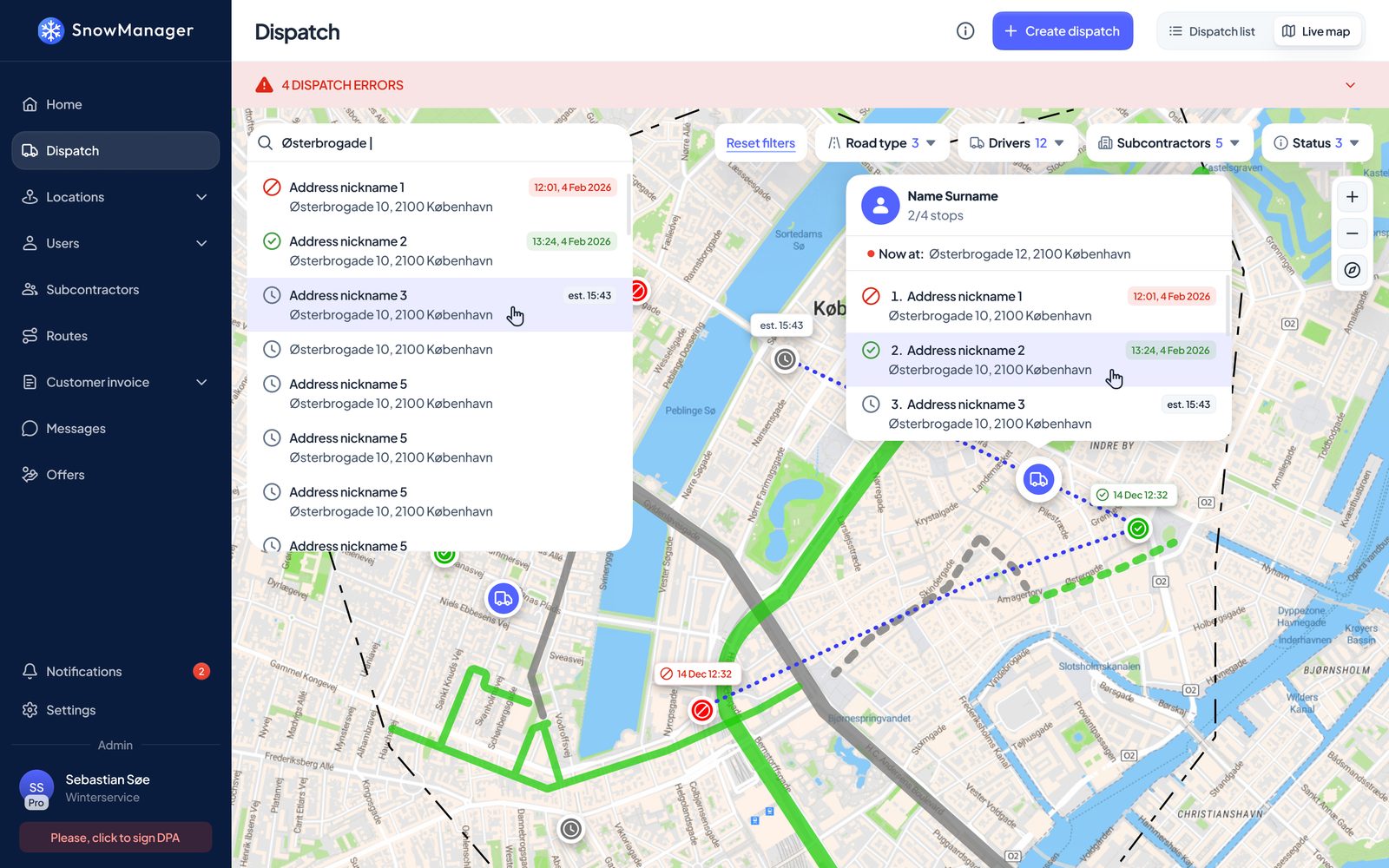
While a dispatch runs, the office sees it live: every stop's state, every crew's progress, updated continuously. A stop a driver completes turns green for everyone within seconds, including for the other driver on the same route, whose own app refreshes itself the same way.
What this kills is the status phone call. Nobody calls a driver mid-storm to ask where they are; the map already says. Nobody drives to a site a colleague finished twenty minutes ago; the stop already changed colour. When a customer calls about an urgent extra, the dispatcher can see who's nearest and still active, and route the job accordingly. We walked through that re-planning loop in the route planning guide; the tracker is what makes it possible.
Geozones: The Drawn Area Is the Tracker
Here's the design decision that makes tracking precise instead of approximate. In SnowManager, every address carries drawings: the car park to plow, the paths to salt, outlined on the map, per work type. Those drawings aren't just instructions for the driver and the basis for quoting; their union is the address's geozone.
That means the system knows the difference between "drove past the property" and "was on the property, in the area we're paid to clear". The tolerance is deliberately small: the drawn area plus about 15 metres, enough to cover the truck parked at the edge of what it clears and ordinary GPS error, and no more. An address with no drawings yet falls back to a circle around its pin, 60 metres by default and adjustable per address, which is your reminder to draw it properly. Even a drawn line, a kerb or a path, counts with its own tolerance.
The practical instruction hiding in this: draw the area you want cleared, not a generous halo around it. The drawing is simultaneously the job description, the quote basis, and the tracker's definition of "arrived".
Check-In and Check-Out, Without Hands
With geozones in place, the timestamps stamp themselves. The phone enters the zone: check-in. The phone has been outside the zone for five minutes: check-out. The five-minute rule absorbs the reality of plowing, where a vehicle exits the area to turn around or dump a bucket without being finished.
Routes can also close stops automatically on departure (completion by GPS), or leave completion as an explicit driver action where you want a human decision, with the arrival and departure times still recorded either way. That's a per-route switch, because a straightforward salting run and a complex clearing job deserve different levels of automation.
Manual check-in and check-out still exist for the edge cases. But the default is that the record happens because the truck was there, not because someone remembered to say so. We covered the cab-side experience in the crew app guide.
From Timestamps to Money
Tracking data that stays in a map view is a toy. The reason it matters is what it feeds:
- Proof of service. Every stop carries its check-in, check-out, outcome and photos. The 8:15 AM complaint is answered with the 02:38 record, shared with the customer while they're still on the phone. Customers with portal access can see it themselves without calling at all.
- Hourly billing. For addresses priced per hour, the invoice line's quantity is literally check-out minus check-in. No timesheet transcription, no rounding disputes; if the times are missing, the line is drafted at zero with a note, visibly wrong rather than silently wrong.
- Site reality checks. Planned versus actual time per stop, over a season, tells you which sites are under-quoted, which routes are overloaded, and where the next season's prices need to move.
The full billing pipeline is its own post later in this series; the short version is that every honest invoice starts with an honest timestamp.
Driver Privacy: Track the Drive, Not the Person
Tracking fails when drivers work against it, and drivers work against systems that feel like surveillance. The line that keeps trust is simple: record the dispatch, not the person's life.
In practice: position is recorded for the dispatch the driver started, while it runs, and the phone records one dispatch at a time. The app explains, in plain language the first time it asks for location permission, what is recorded and what it's used for. Ask the same question of any tracker you evaluate, and ask it in front of your drivers; the vendor's answer, and your drivers' faces, will both be informative.
Field note: introduce tracking as the thing that ends billing disputes and 6 AM blame calls, because that is what it is. The crews who've been accused of skipping a site they actually cleared are usually the fastest converts.
Hardware Trackers vs the Phone in the Cab
Dedicated vehicle trackers have their place (fuel, maintenance telemetry, theft), but for service proof they have a structural problem: they know where the truck is, not what job it's on, who's driving, or what happened at the stop. The phone-based approach ties position to the dispatched stop, the driver, the outcome and the photos in one record, with no per-vehicle hardware cost, and it works the same when a subcontractor's truck covers your route.
If you already run hardware trackers for fleet management, keep them for fleet management. For the question "can we prove the work and bill from it?", the answer lives in the dispatch system.
Conclusion and Next Steps
A snow plow tracker app earns its place when it turns "trust me" into "here's the record": live progress for dispatch, geozone check-ins stamped by the drawn service areas, five-minute-rule check-outs, and timestamps that flow straight into proof of service and hourly invoices. GPS tracking for a snow removal company isn't about watching trucks; it's about never again losing an argument you were right about.
Tracking is built into SnowManager rather than bolted on: the same drawings that quote the job define the geozone that proves it. See where it fits in the whole stack in What Software Do Snow Plowing Companies Use?, or book a demo and we'll replay a real storm night on the live map.