
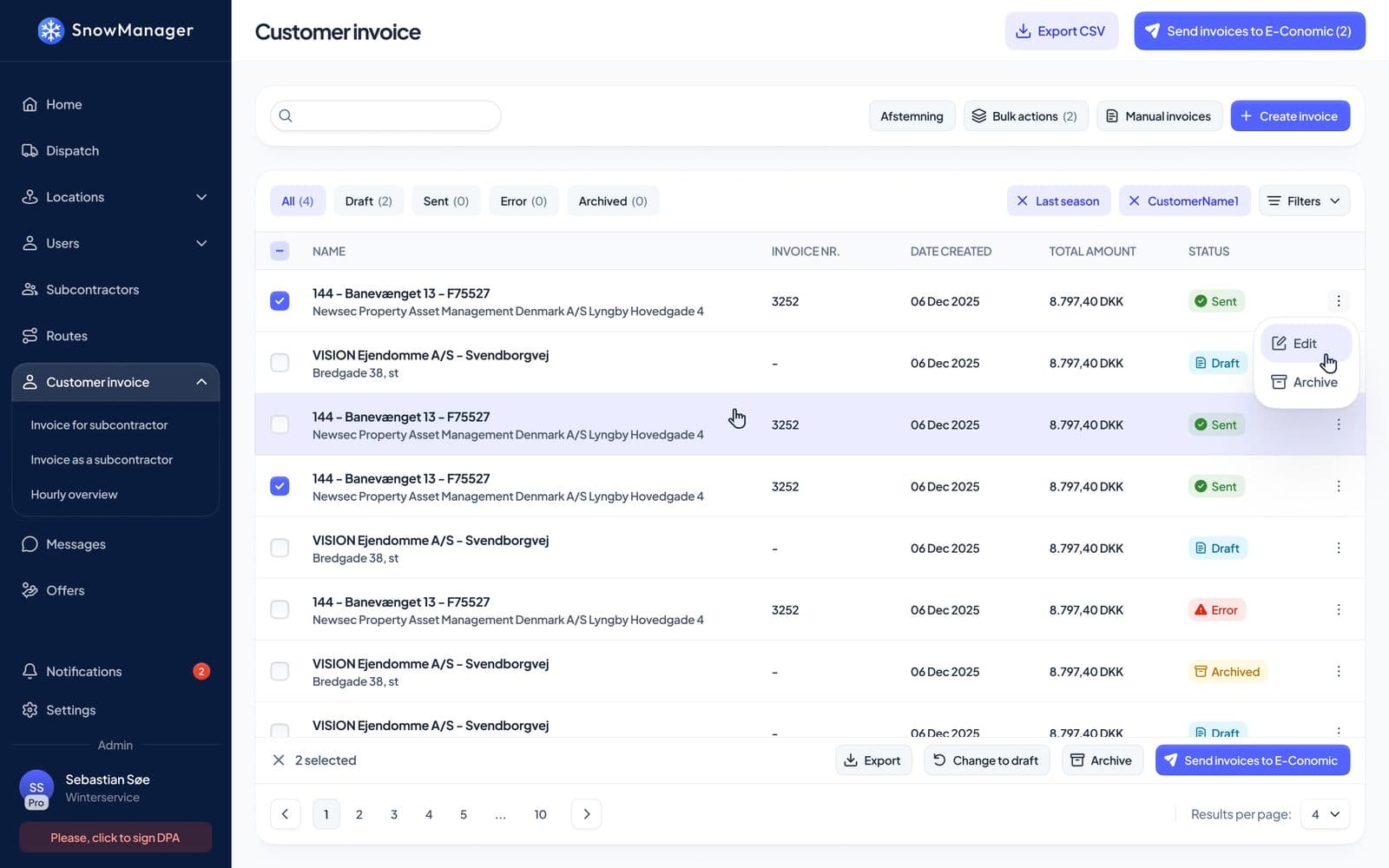
Ask a snow contractor what season they dread and you'll hear about January. Ask their bookkeeper and you'll hear about May: the month of reconstructing a winter from route sheets, text threads and memory, and turning it into invoices that customers will actually pay. Every hour of plowing seems to generate ten minutes of billing archaeology, and every ambiguity resolves, somehow, in the customer's favour.
Snow plowing billing software exists to delete that month. Not by making invoices prettier, but by changing where invoices come from: instead of being written after the fact, they're drafted automatically from the operational record, at the moment the work is confirmed. This guide covers what that looks like and what to demand from any system you evaluate.
The Four Ways Snow Work Gets Priced
A billing system for winter services has to speak four pricing languages, often on the same street:
- Per task. The workhorse. Every completed visit is one line at the address's price for that work type. Two dispatches in one day means two lines, and a good system flags the second as a possible duplicate for a human to judge rather than deciding alone.
- Hourly. The line's quantity is the recorded time on site: check-out minus check-in, to two decimals. This only works when the timestamps are automatic, which is why billing quality is really a field-data question; see our GPS tracking guide for where those times come from.
- Per season. The customer pays a fixed amount, split into instalments (Season fee 1 of 2, 2 of 2, and so on) over your configured season. Completed visits produce no per-visit customer lines, but the work is still recorded and visible; the customer paying in a snowless December can see exactly what readiness they're paying for.
- No price yet. The honest fourth type. Plenty of addresses go live before the price is agreed. The system should bill nothing, but forget nothing: every completed stop stays billable, and the moment a real price lands on the address, it offers to bill this season's unbilled work retroactively.
One more wrinkle worth demanding: pricing type per work type on the same address. Salting per task and clearing per hour on one property is a normal contract, and software that forces one model per address will fight your sales team all autumn.
Where Invoice Lines Should Come From
Here's the core mechanism. When a dispatch's work is done and someone presses confirm, the system drafts the invoice lines: one line per completed address, priced by its pricing type, landing on that customer's open draft invoice for the month the work happened. The same month's work collects onto one draft per customer, so the customer gets one readable invoice, not forty.
Notice what's absent: nobody typed anything. The office's job shifts from data entry to review: open the draft, read the lines, fix what reality demands (edit a quantity, add a custom line for the tow-out, archive a line that shouldn't bill), attach a note or a photo for the customer's benefit, and send. Confirming twice is harmless; the system remembers what it already drafted and adds only what's new. Stops that ended as Unable or Removed bill nothing and block nothing.
And because drafting happens per confirmation rather than at month-end, billing stops being a cliff. The season's paperwork happens in minutes, continuously, instead of in one brutal week.
Which Price Ends Up on the Line
Pricing disputes are usually traceability disputes, so the lookup order matters and should be visible:
- A price rule on the address whose schedule matches the dispatch's planned time: the weekend rate, the out-of-hours rate. The line gets a badge naming the rule.
- The address's own rate for that work type.
- The work-type default from settings, for addresses with no rate of their own.
If none exists, no line is drafted (no silent zeroes on customer invoices), and the stop waits in the retroactive-billing pool. When a customer asks "why this amount?", the answer is on the line itself, not in someone's memory of the contract.
The Safety Nets: Duplicates, Zeroes, and Missing Prices
The difference between billing software and an invoice generator is the set of things it refuses to do quietly:
- Possible duplicate badges when a line may bill work another dispatch already billed the same day, for a human to judge.
- Zero-with-a-note when an hourly stop is missing usable times: the line is drafted at quantity zero with an explanation, visibly wrong instead of silently absent, so you fix the times rather than lose the money.
- One address, one line even when two routes crossed the same property on one dispatch; the hourly line bills the sum of the passes.
- Sent means locked. A sent invoice takes no quiet edits; changing it means explicitly pulling it back to draft, with history recording who changed what.
Field note: audit your last season for the two classic leaks, in both directions: work done but never billed (usually no-price addresses and forgotten extras) and work billed twice (usually overlapping dispatches). Whichever number embarrasses you more, that's the safety net to demand first.
Subcontractor Settlement from the Same Record
If subcontractors do part of your work, billing is two-sided: the customer's invoice and the subcontractor's settlement, and they must agree. The clean design prices each completed stop once per link in the chain: the owner bills the customer at the owner's price, and settles with the subcontractor at the agreed cost, both drafted from the same completed stop. Linked lines know about each other; edit one while both are drafts and the system asks whether the change should propagate.
That's how "the customer paid for 40 visits but we settled the sub for 43" stops being an end-of-season discovery. The wider workflow, from onboarding subs to handing them addresses, is in our subcontractor guide.
The Accounting Hand-Off
An invoice isn't done until it's in the books. Look for a direct push to your accounting system (SnowManager sends to e-conomic; the invoice gets its number from the accounting system and failures land in an error state you can see and retry, rather than vanishing), plus exports for everything else: hourly overviews, per-supplier monthly summaries, archived-line audits, in Excel or CSV. If a customer or an enterprise partner needs their own invoice basis format, exports are where that lives.
The rule to enforce: nothing gets typed twice. Field record to draft, draft to sent, sent to accounting, each step a hand-off rather than a transcription.
What to Ask a Billing Software Vendor
- Can one address carry different pricing types per work type?
- Show me the exact moment a completed dispatch becomes invoice lines. Who pressed what?
- Where does an hourly line's quantity come from, and what happens when the times are missing?
- What stops me billing the same work twice?
- How do seasonal instalments work, and what happens to per-visit lines under a seasonal contract?
- When I raise a price mid-season, what happens to existing draft lines? (Correct answer: nothing; lines are priced at drafting time.)
- Show me the subcontractor settlement line for the same completed stop as a customer line.
- What lands in my accounting system, and what happens when the push fails?
Conclusion and Next Steps
Good snow plowing billing software is mostly invisible: it watches confirmed dispatches, drafts honest lines from recorded work, refuses to duplicate or zero things silently, settles both sides of every stop from one record, and hands finished invoices to accounting without a keyboard involved. The bookkeeper gets May back, and the customer gets invoices that survive scrutiny, which is worth more than any feature: it's the reputation that renews contracts.
Billing in SnowManager works exactly as described because it's fed by everything upstream: dispatch, GPS timestamps, and field documentation. See the whole stack in What Software Do Snow Plowing Companies Use?, or book a demo and bring last winter's messiest invoice dispute.